
The Matrix phone with GrapheneOS
A smartphone that works just like you're used to - but without Google following your every move.
Pre-configured, tested and ready to use straight out of the box.
Swedish support
010 - 10 11 222
Secure payment
Swish, cards, crypto
5-10 days
delivery
Handbook
in Swedish
Configured locally
in Dalarna
What makes Matrix different from a regular smartphone?
A regular Android phone continuously sends data to Google - your location, your searches, what apps you use and when. iPhone does the same to Apple. Matrix with GrapheneOS gives you the same user experience but without the surveillance.
Matrix with GrapheneOS
- No location data is sent without your active choice
- Stricter access control - you decide per app
- No advertising ID or tracking profile
- No telemetry - the system does not ”phone home”
- 100% open source - reviewed by security researchers
Regular Android / iPhone
- Google/Apple knows where you are around the clock
- Apps can access microphone, camera and contacts in the background
- Advertising networks build profiles on your behaviour
- The operating system collects telemetry constantly
- You cannot verify what the code actually does
At the same time, it works as usual: BankID, Swish, Spotify, maps and most apps you use today work instantly.
What you get
All models are based on the Google Pixel - the same phone millions of people use every day, but with an operating system that respects your privacy. We install and configure everything for you.
In the box
- Google Pixel phone
- USB-C cable
- Handbook in Swedish
- Charger available as an option
Included in the service
- GrapheneOS pre-installed
- Secure apps configured
- BankID and Swish ready
- Swedish support for questions
- Manual quality control
Not sure which one? Call us on +4610-10 11 222 and we'll help you choose.
Did you know that...
approx 340×
...per day is a regular Android phone contacting Google's servers - even when you are not actively using it.
264.59
billion dollars is what Google earned from advertising in 2024.
0
... times does GrapheneOS contact Google's servers. Your data stays with you.
Why the Matrix phone?
Google does not see what you do
You control the microphone, camera and location data. No tracking in the background - your data stays with you.
Same experience
The user interface is identical to a standard Android. No learning required - it works as you are used to.
BankID and Swish work
Most banking apps work great directly in the secure profile - no weird workarounds.
Updates for many years
Security updates will come automatically. The Pixel series will be supported for longer than most mobiles on the market.
Open source code
All code is auditable - no hidden backdoors. Independent security audits have been conducted.
Support that actually helps
Call or email us. We'll answer in Swedish without technical jargon - and help you solve problems.
”If I were configuring a smartphone today, I'd use GrapheneOS as the base operating system.”
Edward Snowden, 2019 - See tweet
Frequently asked questions
Daily use
Can a non-technical person use this on a daily basis?
Yes, it does. The interface looks and works just like regular Android - no learning required. You make calls, browse, message and use apps just like you're used to.
The experience of users and technology reviewers is that after a short period of insertion, GrapheneOS blends into the background and feels like ”a pure Android phone without bloatware.” Since the Matrix mobile comes pre-configured by us, the technical barrier is completely eliminated - you do not have to install the operating system yourself.
Do notifications and push notifications work?
Yes, it does. Apps with their own push systems (e.g. Signal and Telegram) work directly. Apps using Firebase Cloud Messaging (most common apps, including Swish) require sandboxed Google Play Services to be installed and exempt from battery optimisation.
The Matrix mobile comes with this setting already configured, so notifications should work reliably straight out of the box.
How is the battery life?
Generally as good or better than regular Android. Because fewer background services are running, many users report 10-15 % better idle battery life. Installing sandboxed Google Play adds some background drainage, but the net effect is still positive compared to a regular Pixel with all Google services active.
Tips: To maximise battery life, you can put Google Play Services in a separate user profile and only activate it when needed.
Do calls, SMS and MMS work as usual?
Yes, all basic telephony works identically to regular Android. VoLTE, 5G calls, SMS, MMS and Visual Voicemail are supported. RCS messaging (Android's version of iMessage) works via Google Messages with sandboxed Play Services. Wi-Fi calling works with most carriers.
Does Bluetooth work with cars, headphones and smartwatches?
Regular Bluetooth works as normal - headphones, speakers, car stereo and file transfer work as expected. Android Auto is also supported.
Smart watches are more nuanced: Garmin watches work well and additionally offer Garmin Pay as a contactless payment option. Wear OS watches (e.g. Pixel Watch, Galaxy Watch) work partially, but pairing may require some troubleshooting. GrapheneOS also enables Bluetooth MAC address randomisation by default, which means your phone cannot be tracked via the Bluetooth signal.
Apps and compatibility
Do all apps work?
The vast majority. With sandboxed Google Play installed, everyday apps like Instagram, Facebook, TikTok, WhatsApp, Signal, Telegram, Spotify, Netflix, YouTube, and Google Maps work seamlessly. They can also run in a separate, isolated profile to keep them completely separate from your private data.
The few that can cause problems are apps that require strict Play Integrity API verification - most notably Google Wallet and the occasional DRM-heavy streaming app at HD quality. In Sweden specifically, the McDonald's app and some parking payment apps have been reported as non-functional.
There is a community-maintained compatibility database which tracks hundreds of apps by country and bank - including Swedish banking apps. Feel free to check there if you are wondering about a specific app.
Do BankID, Swish and my banking app work?
Yes - BankID and Swish both work with sandboxed Google Play Services. Several Swedish users on Pixel 7, 8 and 9 confirm months of trouble-free use. Most Swedish banking apps (Handelsbanken, Nordea, SEB, Swedbank, Länsförsäkringar) work.
Good to know: The first activation of BankID may require you to stand outside so that the GPS position can be found. Occasional BankID updates (e.g. version 4.7.7) have caused short-term compatibility issues that were quickly resolved.
Recognised exception: Kivra (government and corporate digital mail) sometimes blocks GrapheneOS users by misinterpreting the phone as ”rooted.” The reports are inconsistent - some have no problems, others are blocked.
Can I pay contactless? Does Google Pay work?
Google Wallet/Pay unfortunately does not work on GrapheneOS - this is the most known limitation globally. But for Swedish users there is a good solution: Swish's built-in NFC payment function works. You can add a payment card to Swish and tap in shops just like with Google Pay.
Other options include Curve Pay (available in the EU) and Garmin Pay via a Garmin smartwatch. So while Google Pay is not available, there are fully functional routes to contactless payment in the UK.
How good is the camera?
GrapheneOS comes with its own camera app that takes good pictures and also automatically removes EXIF metadata (location, time, device information) - a privacy benefit. However, it lacks Google's advanced computational photography like Night Sight, portrait mode and astrophotography. You can install the official Google Pixel Camera app via sandboxed Google Play. Then you get exactly the same image quality and AI features as on a regular Pixel phone. OpenCamera is another great camera app with many features.
Privacy and security
What is sandboxed Google Play - and isn't it counterproductive?
This is the most common misconception among new users, and it is worth clearing up properly.
On a regular Android, Google Play Services has system level privileges - it can access files, contacts, location and hardware identifiers, and send comprehensive telemetry even when the phone is lying unused. You cannot switch it off.
On GrapheneOS, Google Play runs as a regular app in a sandbox without special privileges. You control every permission - network, location, sensors, storage - and can revoke them at any time. Even with Google Play installed and a Google account signed in, GrapheneOS provides dramatically better privacy than regular Android.
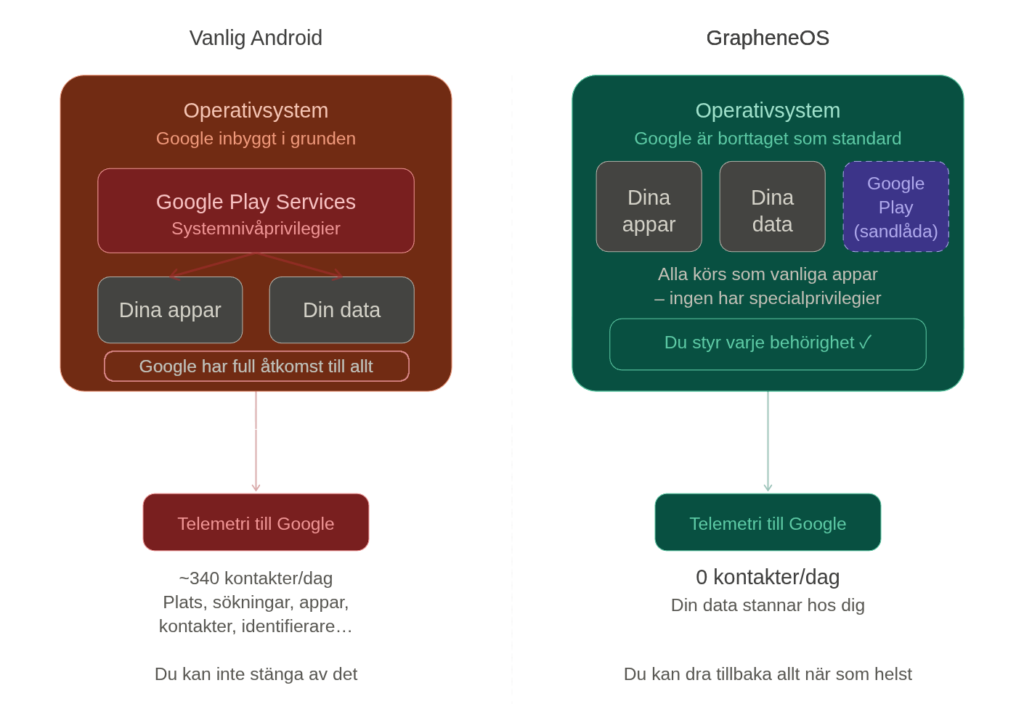
Think of it this way: on regular Android, Google is a built-in part of the foundation. On GrapheneOS, Google is a guest that can only do what you explicitly allow.
How is this different from just not logging in with Google on a regular Android?
The difference is fundamental, not cosmetic. On stock Android without Google account, Google Play Services still runs with system-level access and collects extensive telemetry - one study found that Android collects about 20 times more data than iOS. You cannot revoke these permissions.
GrapheneOS removes all Google services by default and adds a range of security features that are completely missing in regular Android: per-app network and sensor permission controls, hardened memory allocation, per-connection MAC randomisation for Wi-Fi, storage and contact delimitation, and much more. See the GrapheneOS feature overview for the full list.
Is it impossible to trace me?
We're not promising magic - but GrapheneOS gives you control not found on ordinary phones.
GrapheneOS protects against: app tracking, Google telemetry, advertising network profiling, background access to microphone/camera/contacts, and Wi-Fi/Bluetooth tracking (thanks to automatic MAC randomisation).
GrapheneOS does not protect against: operator triangulation (with the mobile network switched on, your operator can always see roughly where you are - this applies to all phones), or physical access in case of weak password.
You can actively switch off: GPS, Wi-Fi, Bluetooth and mobile data - separately or all at once. You decide what information your phone transmits.
Can my employer or school track my phone?
No - no employer or school can remotely install tracking or mobile device management (MDM) software on a GrapheneOS device without your explicit consent. You must manually install an MDM app and give it Device Admin permissions.
Enterprise MDM solutions like Microsoft Intune and Google Workspace, which rely on system-level Google Play Services, generally don't work with the GrapheneOS sandbox model - which many users see as an advantage. For BYOD (Bring Your Own Device) scenarios, GrapheneOS' work profile feature allows you to isolate job apps from private data.
Is it legal? Does it affect the warranty?
GrapheneOS is fully legal in all countries. Google's official warranty does not list installation of alternative operating systems as warranty-breaking - unlocking and relocking the bootloader is an intended part of the hardware design.
In practice, if necessary, you can flash back to stock Android before sending the phone in for repair. Documented cases show that Google has honoured the warranty even when a service technician initially had objections.
Changing your phone
How do I move data from my old phone?
Contacts: Export your contacts as a VCF file from your old phone, the method varies depending on the phone model. See the Apple's official guide (iPhone) or Google's guide (Move the file (via USB, computer or a secure cloud service like Proton Drive) and import it into the Contacts app on your Matrix mobile.
Photos and files: Transfer via USB cable to a computer and then to your new phone, or use an encrypted cloud service like Proton Drive.
Can I go back to regular Android?
Yes, you can. You can restore stock Android with Google's web-based Android Flash Tool. The process takes about 20 minutes and is officially documented. All personal data is deleted during the process.
So you are never locked in - if you want to go back, you can always do so.
Why only Pixel phones?
Only Pixel phones meet GrapheneOS' strict hardware security requirements: Titan M security chip, verified boot with lockable bootloader, StrongBox key storage, and hardware-based memory tagging (MTE) on Pixel 8 and newer. No other Android manufacturer currently offers this combination.
However, Motorola announced a partnership with the GrapheneOS Foundation at MWC in March 2026, which will broaden device support going forward. Expected Motorola devices are expected Q4 2026 / Q1 2027.
Technical issues
How to use multiple user profiles?
GrapheneOS supports up to 32 user profiles (compared to Android's default limit of 4). Each profile has separate encryption keys and completely isolated app data - apps in one profile cannot see or access data in another.
Common setups: one profile for daily use, one for banking, one for social media. Each profile can have its own VPN configuration. The ”End Session” function clears encryption keys from a secondary profile without rebooting.
Tips for beginners: Start with a single profile. You can always add more as you feel comfortable.
Will 5G and my mobile subscription work?
Yes, it does. GrapheneOS does not change the phone's modem or radio behaviour - carrier compatibility is identical to a regular Pixel. Sweden is on Google's official list of countries with Pixel 5G support, and the phones support all critical Swedish 5G bands (n1, n3, n7, n28, n78).
All four major Swedish operators - Telia, Tele2, Telenor and Tre - work without problems. eSIM is supported (activated in Settings). No Swedish operator-specific problems have been reported.
How long will my phone receive security updates?
GrapheneOS follows Google's support timeline. Pixel 8 and newer get 7 years of updates; Pixel 6/7 series got 5 years. GrapheneOS also delivers security patches as fast or faster than Google's own rollouts.
When a Pixel model reaches end-of-life, GrapheneOS recommends upgrading to a device with active support. Official end-of-life dates per model can be found at GrapheneOS FAQ and endoflife.date/pixel.
What happens if GrapheneOS stops developing?
GrapheneOS is run by a registered Canadian non-profit foundation with several full-time developers, funded by donations and corporate partnerships. The project has survived major trials (CopperheadOS split in 2018, leadership change in 2023) and has grown steadily since then.
The Motorola partnership from March 2026 further reduces the risk. If development does stop, you can revert to stock Android at any time. The code is open source and can continue to be developed by others. The growing user base and institutional partnerships make discontinuation increasingly unlikely.
Good to know
FUTO Keyboard - recommended keyboard
The default keyboard in GrapheneOS lacks swipe typing and has basic autocorrect. The FUTO Keyboard is the most recommended option in the community, with good voice-to-text support and complete privacy - all processing is done locally on the phone. Read more in our article on FUTO.
First week is the deposit period
Every long-term review emphasises the same thing: the first week - when you're discovering apps, adjusting settings and getting used to the system - is the hardest part. Then the phone blends into everyday life and feels completely natural. Because the Matrix mobile comes pre-configured by us, that period is significantly shorter.
Backups require configuration
GrapheneOS uses Seedvault for encrypted backups, which works differently than Google's cloud backup on regular Android. We recommend setting up Seedvault early and considering Syncthing for continuous file synchronisation. Get in touch with us if you need help getting started.
Check app compatibility before switching
The community maintains a comprehensive, crowd-sourced app compatibility database per country and bank - including Swedish banking apps. Feel free to check there if you are wondering if a specific app works before switching.
Digital minimalism - an unexpected bonus
Several long-term users report that switching to GrapheneOS helped them reduce their phone use and break bad habits. The awareness required to select and configure apps creates a healthier relationship with the device - a positive side effect that many had not anticipated.
For those who want to know more
The Matrix phone is built on carefully selected hardware and software. Here are the details for those who want to dig deeper.
Why Pixel?
The Google Pixel series has hardware-based security features that are missing from other phones - including the Titan M2, a dedicated security chip that protects encryption keys and verifies that the system has not been tampered with.
GrapheneOS in depth
GrapheneOS is a security-hardened operating system with advanced app isolation, memory protection and stricter authorisation controls than standard Android. The project is driven by security researchers and is completely open source.
The developer explains
Still not sure?
Tell us what you use your mobile phone for today and we'll help you choose the right model. No pressure to buy - just honest advice.
+4610 - 10 11 222 - Monday-Friday
 SV
SV  EN
EN